

Viewing Browser Background Image Fill doesn't Fill in Footer
Browser Background Image Fill doesn't Fill in Footer
|
User: Guest 13 years ago
|
|
The Background Image Fill is now not filling in the footer section. It is squeezed onto just the body and the header, leaving the footer blank. If you look at my screen shot, the gray section of my Browser Background image fill is suppose to be where the footer is; which is now left white. Thanks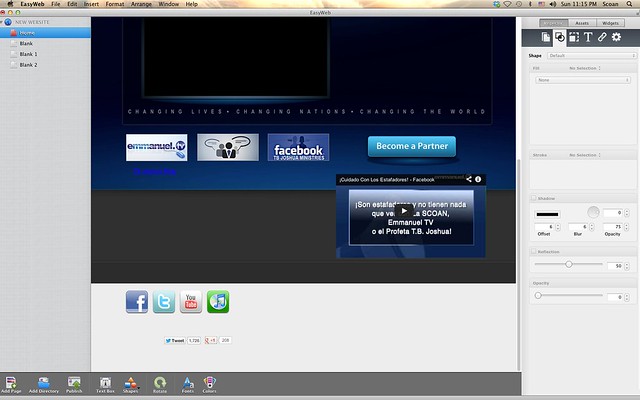
|
|
| Edit | |
|
User: Paul-RAGESW 13 years ago
|
|
|
Hi, Can you go to the Window menu and select 'Show Layout' and then post another screenshot here. Also can you show me the settings you have for the Page Background Image Fill. ------------------------------- Paul EverWeb Developer |
|

|
User: Guest 13 years ago
|
|
|
[quote="admin":2r5jogha]Hi, Can you go to the Window menu and select 'Show Layout' and then post another screenshot here. Also can you show me the settings you have for the Page Background Image Fill.[/quote:2r5jogha] This is how it looks in EasyWeb... (the gray part is supposed to be where the footer is)  This is how it looks in iWeb. (The way it should look) 
|
|
| Edit | |
|
User: Paul-RAGESW 13 years ago
|
|
|
Can you please also show what settings you have set for the Browser background in your Inspector in EasyWeb?
------------------------------- Paul EverWeb Developer |
|
|
User: Guest 13 years ago
|
|
|
[quote="admin":1jua7vfn]Can you please also show what settings you have set for the Browser background in your Inspector in EasyWeb?[/quote:1jua7vfn] I using Beta 19 and it is still not fitting. Please help with this issue. Thank you.  
|
|
| Edit | |
|
User: Guest 13 years ago
|
|
| I just installed beta 20 and I'm experiencing the same issue. Have you made any progress on it? | |
| Edit | |
|
User: Paul-RAGESW 13 years ago
|
|
|
Can you send me your browser background image.
------------------------------- Paul EverWeb Developer |
|
|
User: Guest 13 years ago
|
|
|
[quote="admin":1ee4zfb8]Can you send me your browser background image.[/quote:1ee4zfb8] Okay thanks |
|
 Emmanuel-backround-bend1.jpg |
|
| Edit | |
|
User: Roddy 13 years ago
|
|
|
Your browser background image is not big enough to fill the background height. You need to either use "Tile" or stretch the image. Another alternative is to use a black template and the bottom of the browser background will be black and not so obvious. ------------------------------- Roddy Website: http://everwebwidgets.com Contact: http://everwebwidgets.com/ewWidgets-home/contact.html NOTE: I am an EverWeb user and NOT affiliated with EverWeb! Any opinions expressed in this forum are my own. |
|

|
User: Roddy 13 years ago
|
|
|
You could also insert it as out shown in this topic... http://ragesw.net/easyweb-beta/viewtopic.php?f=6...t=921 Example using your image modified a little... http://roddymckay.com/EasyWeb/test/background-image-ebk.html ------------------------------- Roddy Website: http://everwebwidgets.com Contact: http://everwebwidgets.com/ewWidgets-home/contact.html NOTE: I am an EverWeb user and NOT affiliated with EverWeb! Any opinions expressed in this forum are my own. |
|
|
User: Guest 13 years ago
|
|
|
[quote="Roddy":1nq7zknb]Your browser background image is not big enough to fill the background height. You need to either use "Tile" or stretch the image. Another alternative is to use a black template and the bottom of the browser background will be black and not so obvious.[/quote:1nq7zknb] I'm sorry but it has nothing to do with the size of the image. I'm using the same background with the same settings in iWeb and it works fine. Not only that, but I noticed that the problem is only within the EasyWeb editor. Everything lines up fine after I publish the page and open it in a web browser, so there is definitely some kind of bug going on here that is not allowing the browser background image to go into the footer area. I need it to work the correct way within EasyWeb because the design of the page revolves around the background image. If you look closely you can see that the top of the image is being cut off because it is not resting at the bottom of the page. If the image was not big enough this would not be the case. I can't use the tile setting because it shifts the image the wrong way. Please have another look. |
|
| Edit | |
|
User: Roddy 13 years ago
|
|
|
What is the total height of your web page - header height + content height + footer height?
------------------------------- Roddy Website: http://everwebwidgets.com Contact: http://everwebwidgets.com/ewWidgets-home/contact.html NOTE: I am an EverWeb user and NOT affiliated with EverWeb! Any opinions expressed in this forum are my own. |
|
|
User: Paul-RAGESW 13 years ago
|
|
|
Ok sorry for the issues here. It's been fixed for beta 21.
------------------------------- Paul EverWeb Developer |
|
| Post Reply |
| You must login or signup to post. |