

Viewing Show/Hide options, dragable menus and new features
Show/Hide options, dragable menus and new features
|
User: Jens_C 13 years ago
|
|
|
First i want to say that i'm Dutch, so i try to do my best in English. Second thank you for inviting me into the beta version. I really appriciate this :) Ans second i have a few suggestions. 1. I love the layout of EasyWeb but i want some more options to it. When i make a site and i work on it i want a big field as editing area. It would be nice if we can show/hide the right menu so the editing field is bigger. I work with a content with of 1100 to 1200. Because i don't like the smal tiny sites. Now when i have a content with of 1200 i always need to scroll from left to right and see where is the middle of the site. With iWeb i don't had this issue. 2. Also dragable menus would be nicer or make on option in the preferences to choose to make them dragable. What i really want to see is that whole the screen is the site editing screen. So that i have a whole screen for editing my site with. Just let the bar on the bottom of the screen in it. With some new symbols just like in iWeb the inspector, photos, and so on... When you click on an item it pop ups and it is drageble just like in iWeb. This would very nice because i love to have a whole screens of editing area with dragable menus. 3. The photo slideshow is nice but make on option so that when the fotos are all in it we can select to auto slideshow screen. So i mean when we upload the site the slideshow begins auto in the screen size that we selected. just like you see on many other sites. An auto slideshow on the homepage with recent new info and a nice picture. Missing this option. 4. I don't know if there are interactive menu bars with a drop down menu option. If it is build in on EasyWeb it is very unclear to make or use it because i don't see that option anywhere. If it is not build in in EasyWeb please make that option because it is very handly and a must on a now a day modern site. 5. Adding a Blog feature or blog page. I really miss this feature...;( On my current site i work a lot with blogs also i make blogs and use the link to put it in a rss as a simple "latest news" feature. So please blog features/pages. 6. A poll feature would also be very nice missing this option to. My site is a game based site for my Clan in game and i have over 200 members that al visit my site. Sometimes my members need to choose a big event that they wanne play. Would be very nice if i could add a poll to my new site so that they simply can choose what they want and that i have i nice overview. 7. Comment, discussion boxes would also be very nice as a feature/page. I really miss this to because reactions and discussions are really important to me as feedback. I think this was it. Also make the features/pages editable such as the style, fonts, and so on. Thank you very much for listening <!-- s:D --><img src="{SMILIES_PATH}/icon_e_biggrin.gif" alt=":D" title="Very Happy" /><!-- s:D --> Cheers, Jens |
|
|
User: Roddy 13 years ago
|
|
|
You can show/hide the inspector from the Window drop down menu or use Option/Command/I. Drop down navigation is being discussed in this topic... viewtopic.php?f=6...t=198...start=20 Blog... viewtopic.php?f=5...t=31 Separate inspector windows have also been suggested. I personally detest them and would rather show/hide the right panel or have a slide out like in Rage's WebDesign app. ------------------------------- Roddy Website: http://everwebwidgets.com Contact: http://everwebwidgets.com/ewWidgets-home/contact.html NOTE: I am an EverWeb user and NOT affiliated with EverWeb! Any opinions expressed in this forum are my own. |
|

|
User: Jens_C 13 years ago
|
|
|
Ok thanks for this information. I found how to make drop down menus now with your information so thanks for that :) The only thing is that the right arrow with a drop down menu need to be removed or make it an option. Also more freedom or menu templates would be nice. The drop down menu don't look like a modern site menu right now. Some examples with what i mean. -------------------------------- -> The light up effect when you go over the buttons. -------------------------------- -> Also the light up effect when you go over the buttons and the style and lay out. -> The Slideshow where a spoke about in my first poste is what i also mean in this picture. So an auto slideshow that directly plays when you open the site and not like now in EasyWeb first the templates and when you click on it that you get a pop up window with slideshow. -------------------------------- -> This is what i mean with the poll feature. Freedom to make it how we want with also some templates where we can start from.  -------------------------------- -> A latest news rss that is linked to the blog page with al the news on it. Also a very nice feature that i can't miss on my site.  -------------------------------- -> And as least the comment/discussion box. These comment box is linked to an inlog on the site. So when you log in the comment/discussion boxes appear and you are able to type your message in it. 
|
|
|
User: Roddy 13 years ago
|
|
Here's an example of a custom drop down menu in EasyWeb...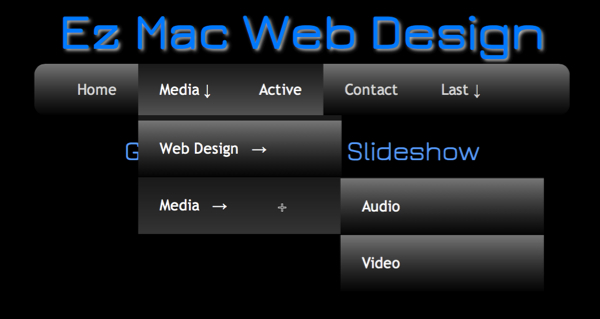 Most of the features you are requesting are considered to be a little more advanced than beginner level. The really good feature of EasyWeb is the ability to insert code into the <head> of the HTML doc as well as into the body via the HTML Widget. This can be done in the Publishing Settings Page for site wide features like the navigation or in the page inspector for items like slideshows which only appear on one page. There are so many different types of slideshows that it is impossible to create one size that fits all! Here's a topic about slideshows with quite a few examples... viewtopic.php?f=6...t=108 I was hoping others would express their opinions and maybe post examples of sliders that they liked. ------------------------------- Roddy Website: http://everwebwidgets.com Contact: http://everwebwidgets.com/ewWidgets-home/contact.html NOTE: I am an EverWeb user and NOT affiliated with EverWeb! Any opinions expressed in this forum are my own. |
|
|
User: Yelena 13 years ago
|
|
|
I love WOW Slider - it was very simple to create and insert into IWeb. You can see samples on some of my sites: www.johneasterlin.com www.potcluckbyelizabeth.com ------------------------------- Yelena MacBook Pro OS X 10.10.3 IMac 21" OS X 10.10.3 |
|
|
User: Yelena 13 years ago
|
|
|
Roddy, How exactly have you created this Nav Bar (drop-down)? I finally learned how to make one but so far I am not sure how to give it shape/gradient fill,etc... Mine comes as just text... ------------------------------- Yelena MacBook Pro OS X 10.10.3 IMac 21" OS X 10.10.3 |
|
|
User: Yelena 13 years ago
|
|
|
[quote="Yelena":2skz6mcv]Roddy, How exactly have you created this Nav Bar (drop-down)? I finally learned how to make one but so far I am not sure how to give it shape/gradient fill,etc... Mine comes as just text...[/quote:2skz6mcv] Never mind....Before I ask I should really explore... Just figured it out... ------------------------------- Yelena MacBook Pro OS X 10.10.3 IMac 21" OS X 10.10.3 |
|
|
User: Yelena 13 years ago
|
|
|
But...another question. The drop-down menu boxes are in different color than the box they are under and I can't figure out how to change that...
------------------------------- Yelena MacBook Pro OS X 10.10.3 IMac 21" OS X 10.10.3 |
|
|
User: Roddy 13 years ago
|
|
|
The menu wasn't created using the EasyWeb interface. It was designed using Rage's WebDesign application. The CSS styles were added to the head code box in the Site Publishing Settings page and the HTML for the menu was added using an HTML Widget. That's the beauty of EasyWeb. You can add as many fancy features as you want really easily due to the fact that you can insert code into the HTML file for the page in three different ways. You don't need to know CSS (or HTML for that matter) to be able to do this. Here's an example of a site where you can get the code for your own custom menu... http://cssmenumaker.com/css3-menus My own attempt has had a lot of customization. It was originally designed to be self centering on a web page which isn't necessary with EasyWeb as Paul has pointed out. It also has features like separation between the main menu and the drop down and the last drop down has ben repositioned so that its sub menus go to the left rather than disappear off the page to the right. Here's an example on a white background to illustrate this... 
------------------------------- Roddy Website: http://everwebwidgets.com Contact: http://everwebwidgets.com/ewWidgets-home/contact.html NOTE: I am an EverWeb user and NOT affiliated with EverWeb! Any opinions expressed in this forum are my own. |
|
|
User: Yelena 13 years ago
|
|
|
Thank you, Roddy!
------------------------------- Yelena MacBook Pro OS X 10.10.3 IMac 21" OS X 10.10.3 |
|
|
User: Jens_C 13 years ago
|
|
|
Roddy, How do i insert a drop down menu from the site that you had posted. I put the css file in the file from EasyWeb where the index, etc... is. And i put the html code in an html box in EasyWeb but it don't work. I just get a non lay out menu bar. Can u plz show me an example with images how to insert such a menu in EasyWeb plzz. <!-- s:D --><img src="{SMILIES_PATH}/icon_e_biggrin.gif" alt=":D" title="Very Happy" /><!-- s:D -->  I want this drop down menu. http://cssmenumaker.com/menu/blue-opera-drop-down-menu And another question, is there a way to change the colours such as the menu bar that have a black colour. I want a lighter colour. Already thanks Roddy. <!-- s:D --><img src="{SMILIES_PATH}/icon_e_biggrin.gif" alt=":D" title="Very Happy" /><!-- s:D --> |
|
|
User: Yelena 13 years ago
|
|
|
I believe Roddy said to put the CSS into Head Code: Quote: The CSS styles were added to the head code box in the Site Publishing Settings page and the HTML for the menu was added using an HTML Widget.
------------------------------- Yelena MacBook Pro OS X 10.10.3 IMac 21" OS X 10.10.3 |
|
|
User: Jens_C 13 years ago
|
|
I did that and this is the result.
|
|
|
User: Paul-RAGESW 13 years ago
|
|
|
At this point you would need to publish your style.css file to a server and reference it using an absolute path in the Head code section for your site. This is an advanced feature and we are really focused on getting the core of EasyWeb ready and bug free before focusing on debugging these advanced issues. ------------------------------- Paul EverWeb Developer |
|

|
User: Jens_C 13 years ago
|
|
|
Ow ok i will try that, Thanks. What about my first and thirth post ? Can u guys implement all these features in EasyWeb or are there some features that aren't possible to implement in EasyWeb ? Thanks. |
|
| Post Reply |
| You must login or signup to post. |