

EverWeb Website - Page 2 - Forum
This discussion started in October 2013. EverWeb has changed a lot since then, so some answers may no longer apply.
Find up-to-date answers in the EverWeb help articles. Still stuck? Start a new thread or contact support.
EverWeb Website
|
User: Paul-RAGESW 13 years ago
|
|
|
In Safari hold down the shift key and press the reload button to force a reload.
------------------------------- Paul EverWeb Developer |
|

|
User: Yelena 13 years ago
|
|
|
I did reload, it doesn't help. And the same problem on an IPad. One more on "Features" page Quote: The demo version allows you build a complete website. Should be ALLOWS YOU TO BUILD...
------------------------------- Yelena MacBook Pro OS X 10.10.3 IMac 21" OS X 10.10.3 |
|
 Screen Shot 2013-10-28 at 8.26.42 PM.jpg |
|
|
User: Yelena 13 years ago
|
|
|
And by the way, the same problem in Chrome. Firefox looks great....
------------------------------- Yelena MacBook Pro OS X 10.10.3 IMac 21" OS X 10.10.3 |
|
|
User: pumpkin 13 years ago
|
|
|
Odd, I don't see those glitches. Neither on Safari, Chrome or Firefox. Great looking site. I like the preview of the templates. If I didn't already use EverWeb, I'd sign up ... ;) @lars: I don't know what your problem is. All the information your looking for is there. ------------------------------- Darian new to web design ______________________ My websites: <b>Vocal Affairs</b> // <b>Singkehlchen</b> |
|
|
User: Roddy 13 years ago
|
|
|
I don't see any problem either but the main cause of this kind of thing is having the text box too close to the text and thus forcing a return in some browsers - usually Internet Explorer. In the image below, the first box is too tight while the one below gives the text a little breathing room. 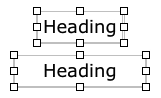
Last edit 13 years ago ------------------------------- Roddy Website: http://everwebwidgets.com Contact: http://everwebwidgets.com/ewWidgets-home/contact.html NOTE: I am an EverWeb user and NOT affiliated with EverWeb! Any opinions expressed in this forum are my own. |
|

|
User: Roddy 13 years ago
|
|
I does however need fixed for iPad...
------------------------------- Roddy Website: http://everwebwidgets.com Contact: http://everwebwidgets.com/ewWidgets-home/contact.html NOTE: I am an EverWeb user and NOT affiliated with EverWeb! Any opinions expressed in this forum are my own. |
|
|
User: shaun 13 years ago
|
|
| This is screenshot from an ipad... | |
 image.jpg |
|

|
User: Paul-RAGESW 13 years ago
|
|
|
Check again, it should be working now.
------------------------------- Paul EverWeb Developer |
|
|
User: Roddy 13 years ago
|
|
|
It's fine on iPad now.
------------------------------- Roddy Website: http://everwebwidgets.com Contact: http://everwebwidgets.com/ewWidgets-home/contact.html NOTE: I am an EverWeb user and NOT affiliated with EverWeb! Any opinions expressed in this forum are my own. |
|
|
User: shaun 13 years ago
|
|
| just an observation - at the bottom of the page you have desktop button, after clicking on it to see how the desktop version looks how does one go back to the mobile version with just 1 click? | |
|
User: Paul-RAGESW 13 years ago
|
|
|
Quote: shaun - 29/10/2013 12:10:56 just an observation - at the bottom of the page you have desktop button, after clicking on it to see how the desktop version looks how does one go back to the mobile version with just 1 click? You'd have to reload the website by going to http://www.everwebapp.com Last edit 13 years ago ------------------------------- Paul EverWeb Developer |
|
|
User: shaun 13 years ago
|
|
|
Quote: Paul-RAGESW - 29/10/2013 12:16:15 Quote: shaun - 29/10/2013 12:10:56 just an observation - at the bottom of the page you have desktop button, after clicking on it to see how the desktop version looks how does one go back to the mobile version with just 1 click? You'd have to reload the website by going to http://www.everwebapp.com that's not too convenient on a smart phone interface, it's a shame that at the bottom of the desktop version their isn't a button for mobile option. (2 way switching) |
|
|
User: Paul-RAGESW 13 years ago
|
|
|
Quote: that's not too convenient on a smart phone interface, it's a shame that at the bottom of the desktop version their isn't a button for mobile option. (2 way switching) It's something we can add at a later time. ------------------------------- Paul EverWeb Developer |
|
|
User: Yelena 13 years ago
|
|
|
NOW it looks great in my Safari and Chrome browsers!
------------------------------- Yelena MacBook Pro OS X 10.10.3 IMac 21" OS X 10.10.3 |
|
|
User: johnorsue 13 years ago
|
|
|
Looking Good!
------------------------------- MacBook Pro / OSX Sierra 10.12.6 www.dustnlint.com |
|

| Post Reply |
| You must login or signup to post. |